August 11, 2026
How a Solid Metal Monitor Arm Transforms Your Gaming Desk Stability
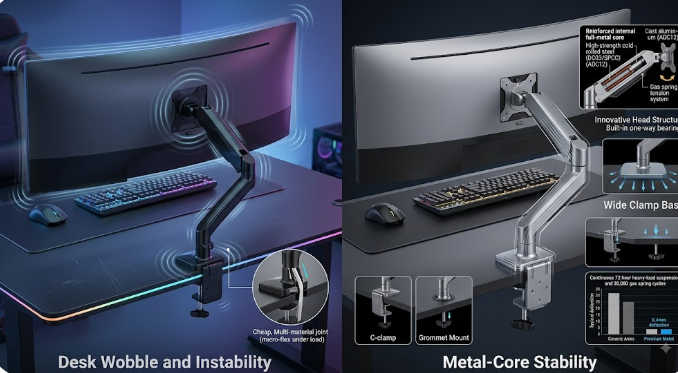
Table of Contents
The Stability Problem Nobody Talks About
Market Reality: Gaming Desks and Monitor Arms Are Booming
Why Your Gaming Desk Wobbles (And Why It Matters)
The Metal Difference: Construction That Actually Holds
Weight Capacity and Distribution: The Physics of Stability
Installation Matters: Clamp vs. Grommet Mount
Real-World Performance Data
Industry Data & Market Comparison
Frequently Asked Questions
1. The Stability Problem Nobody Talks About
Here's something most gamers discover the hard way. You drop serious money on a gaming desk, you mount your expensive ultrawide monitor on an arm, and then—every time you type aggressively or lean on the desk—the whole thing shakes. The monitor wobbles. Your aim suffers. Your expensive setup feels cheap.
This isn't a minor annoyance. It's a performance issue.
The reality is that gaming desk stability isn't just about the desk itself. It's about the entire ecosystem. And the single most underrated component in that ecosystem? The monitor arm. Specifically, a solid metal monitor arm.
Most gamers focus on desk size, RGB lighting, and cable management. They overlook the mechanical foundation that holds everything together. But here's the truth: a poorly constructed monitor arm with flimsy materials will undermine even the most expensive gaming desk. Conversely, a well-engineered metal monitor arm can transform a mediocre desk into a rock-solid gaming platform.
I've seen setups where a $200 desk with a premium metal arm outperforms a $800 desk with a cheap plastic-arm. The difference isn't the desk—it's the arm.
2. Market Reality: Gaming Desks and Monitor Arms Are Booming
The numbers tell a clear story. The global gaming desks market was valued at approximately USD 3.1 billion in 2025 and is projected to reach USD 6.1 billion by 2035, growing at a CAGR of 7.0%. Standard gaming desks dominate with a 44.3% market share, and individual gamers represent a staggering 69.2% of end-users.
But here's what's really interesting. The monitor arms market was valued at USD 2.11 billion in 2025 and is projected to grow to USD 3.26 billion by 2032 at a CAGR of 6.39%. Other sources put the 2025 figure at USD 1.69 billion, growing to USD 2.28 billion by 2030.
Why the rapid growth? Because gamers are waking up to a simple fact: gaming desk stability requires more than just a heavy table. It requires proper weight distribution and quality mounting hardware.
The convertible fashion market might be growing at 9.37%, but the monitor arm market is quietly expanding at over 6% annually. That's significant growth for what many still consider a "niche" accessory.
3. Why Your Gaming Desk Wobbles (And Why It Matters)
Let's get technical for a moment. Heavy monitors mounted on arms create off-center loads that amplify any weakness in the desk structure. Unlike a centered laptop, monitor arms extend the weight forward or to the side. This turns minor flex into noticeable shake during intense gaming sessions or focused work.
Standard standing desks get marketed as "stable" until you put them through actual gaming sessions. Most manufacturers test stability with static loads, not the dynamic forces created by chair movements common in FPS tournaments or late-night RPG sessions.
Here's what happens:
You're in a firefight. You lean forward. The desk flexes.
The monitor arm, made of cheap materials, transfers that movement directly to your screen.
Your crosshair drifts. You miss the shot. You lose.
It sounds dramatic, but it's physics. Every millimeter of wobble translates to reduced accuracy. For competitive gamers, stability isn't a luxury—it's a requirement.
4. The Metal Difference: Construction That Actually Holds
Not all monitor arms are created equal. The material matters enormously.
All-metal construction delivers superior strength and durability. Cold-rolled steel and aviation-grade aluminum are the gold standards. These materials don't flex under load. They don't develop play over time. They simply hold.
Cheaper arms use plastic components in critical joints. Over time, these wear down. The arm starts to sag. The monitor slowly drifts downward. You tighten it, it loosens again. It's a losing battle.
Premium metal arms use reinforced full-metal cores with high-strength cold-rolled steel (DC03/SPCC) and cast aluminum (ADC12). This isn't marketing jargon—it's engineering. These materials resist deformation, maintain tension, and provide the mechanical integrity needed for gaming desk stability.
The difference is noticeable immediately. A metal arm feels solid when you adjust it. It doesn't creak. It doesn't wobble. It just works.
5. Weight Capacity and Distribution: The Physics of Stability
Weight capacity is the most misunderstood specification in the monitor arm market. Many gamers skip this step, buy a sleek arm, mount their 49-inch curved ultrawide beast, and watch it slowly sink over the next week.
Here's the rule: always exceed your monitor's weight by at least 20%.
Heavy-duty monitor arms are now engineered for ultrawide monitors up to 57 inches and 30kg (66lbs). These arms feature innovative head structures with built-in one-way bearings that ensure friction-free tilt adjustments for heavy screens.
But weight capacity alone isn't enough. Distribution matters just as much. A monitor arm that concentrates all the weight on a single small clamp will eventually damage your desk edge. Look for arms with wide clamp bases that distribute load across a larger area.
The best metal arms use gas spring tension systems that can be adjusted to match your monitor's exact weight. This isn't a gimmick—it's essential for maintaining smooth articulation while preventing sag.
6. Installation Matters: Clamp vs. Grommet Mount
How you install your monitor arm is just as important as the arm itself.
C-clamp mounting is the most common. It attaches to the edge of your desk. Simple, tool-free installation. But it requires a desk edge that's thick enough—typically 0.8 to 3.1 inches.
Grommet mounting goes through a hole in your desk. It's more stable because the load is centered over the desk structure rather than hanging off the edge. If your desk has a pre-drilled grommet hole, this is the superior choice.
Here's what many gamers overlook: desk thickness matters. A monitor arm clamp that's rated for desks up to 75mm thick provides flexible, stable installation. If your desk is thinner than that, the clamp won't grip properly. If it's thicker, the clamp won't fit at all.
Check your desk specs before buying. It sounds basic, but I've seen countless gamers make this mistake.
7. Real-World Performance Data
Testing tells the real story. In continuous 72-hour heavy-load suspension tests, properly engineered metal monitor arms maintained zero deflection.
One review of a premium gaming desk with a heavy-duty monitor arm recorded front-to-back wobble of just 0.4mm—even with three monitors mounted on arms. That's essentially imperceptible.
For context, typical cheap monitor arms allow 2-3mm of deflection under similar loads. That difference—1.6 to 2.6mm—is the gap between a stable aim and a missed headshot.
Gas spring mechanisms tested for 30,000 cycles ensure smooth adjustments and long-term durability. That's years of daily use without degradation.
The takeaway is simple: investment in a quality metal monitor arm delivers measurable performance improvements. It's not about aesthetics. It's about function.
8. Industry Data & Market Comparison
Metric | 2025 | 2026 | 2030/2032/2035 Projection | CAGR |
Global Gaming Desks Market | $3.1B | — | $6.1B (2035) | 7.0% |
Gaming Desks Market (Alternate) | $2.1B | — | $3.6B (2034) | 6.8% |
Monitor Arms Market | $2.11B | $2.24B | $3.26B (2032) | 6.39% |
Monitor Arm Market (Alternate) | $1.69B | $1.8B | $2.28B (2030) | 6.5% |
Standard Gaming Desks Share | 44.3% | — | — | — |
Individual Gamers End-User Share | 69.2% | — | — | — |
Online Distribution Channel Share | 71.9% | — | — | — |
North America Market Share | 38.2% | — | — | — |
Key Observations:
The gaming desks market is expanding at 7% CAGR, driven by PC gaming growth and hybrid work patterns
The monitor arms market is growing at a similar pace (6.39%), reflecting increased awareness of ergonomic benefits
Online channels dominate distribution at 71.9%, indicating gamers prefer direct-to-consumer purchases
Individual gamers represent nearly 70% of the market—this is a consumer-driven industry
North America leads regional share at 38.2%, valued at USD 1.1 billion in 2025
9. Frequently Asked Questions
Q: Does a metal monitor arm really improve gaming desk stability?
A: Yes, significantly. Metal construction resists flex and deformation that plastic components cannot. A solid metal arm transfers less movement from the desk to the monitor, reducing wobble during intense gaming sessions.
Q: What weight capacity do I need for my gaming monitor?
A: Always exceed your monitor's actual weight by at least 20%. For ultrawide monitors (49 inches and above), look for arms rated for 30kg (66lbs) or more. Curved monitors often require derating—some arms specify lower weight limits for curved screens.
Q: What's the difference between a C-clamp and grommet mount?
A: C-clamp attaches to the desk edge; grommet mount goes through a pre-drilled hole. Grommet mounts are generally more stable because the load is centered over the desk structure. Both work well if properly installed.
Q: How much does the monitor arm market generate annually?
A: The global monitor arms market was valued at approximately USD 2.11 billion in 2025 and is projected to reach USD 3.26 billion by 2032, according to 360iResearch. Other estimates from The Business Research Company put the 2025 figure at USD 1.69 billion.
Q: What materials should I look for in a quality monitor arm?
A: Cold-rolled steel (DC03/SPCC) and cast aluminum (ADC12) are industry standards. Look for "all-metal construction" in product descriptions. Avoid arms with plastic joints or load-bearing components.
Q: How does desk thickness affect monitor arm installation?
A: Most C-clamp mounts accommodate desk thicknesses between 0.8 and 3.1 inches (20-80mm). If your desk is outside this range, the clamp won't grip properly. Check your desk specs before purchasing.
Q: Why do gaming desks need more stability than office desks?
A: Gaming involves dynamic movements—leaning, rapid mouse movements, keyboard impacts—that create forces office work doesn't. Gaming desks must handle these dynamic loads while maintaining monitor stability for competitive accuracy.